The arcades of the 90's may have long gone out of business, but it is still possible to play those games at home. I am not talking about buying arcade machines, fortunately there is a more practical way. I am not talking about SNES or equivalent home gaming systems either; while some games do have SNES versions, not all arcade games are available in any other format, not to mention SNES versions of arcade games usually differ from the arcade versions. I am talking about playing arcade games on personal computers, with the help of software that emulates the CPU of an arcade machine. Unlike the SNES or other versions, games that are played on these emulators will be exactly the same as their arcade versions.
Though it is possible to find a number of examples for arcade machine emulators, MAME is undoubtedly the most popular choice among arcade gaming enthusiasts. We will focus on MAME in this article, leaving the reader to explore the other alternatives.
The MAME (which stands for Multiple Arcade Machine Emulator) Project is defined on its website as "a strictly non-profit project whose main purpose is to be a reference to the inner workings of the emulated arcade machines, both for educational and preservation purposes". Its first public release was in 1997 and as of version 0.147, it supports 26336 ROM sets with 8726 unique games (according to this data).
The first step of playing games with MAME is to download the program. For Windows, it can be downloaded for free from the project website, http://www.mamedev.org/. There are different options for download, such as 64-bit, i686 optimized etc., you should get the best choice for your system. For other operating systems, there are ports of MAME to Mac OS X, Linux and other operating systems/devices. The website for these ports can easily be found by googling "MAME <operating system name>". There is also a graphical user-interface version of MAME, called MAMEUI (formerly MAME32) for those who don't want to use the command-line version. For this article, we will restrict ourselves to the (64-bit) command-line version, however the principles are more or less the same for every version of MAME. We note that for advanced users, it is also possible to download the source code from the same webpage.
After downloading the program (as of present, the latest version is 0.148), run the exe file and it will extract the files to a folder of your choice, no further installation is necessary. In this tutorial, we will assume that MAME is placed on "c:\mame". To be able to play games though, you still need the data files for the game you want to play, which are known as ROMs. A word of copyright caution is due at this point. Although the MAME software is free, the ROMs and other game-specific files are copyrighted material and depending on the game, it may not be legal to download these files without permission from the copyright owner. Even if you own the PCB (printed circuit board, i.e. the game in hardware form), you might still need explicit permission from the manufacturer to legally play the game on MAME. For more information, check out the "Legal" section on the MAME website. There are some ROMs on MAME website which are authorized to be freely downloaded and used for non-commercial purposes.
After obtaining the ROM for the game you wish to play, place it in the "roms" folder in your MAME directory. ROMs usually come zipped, you should not unzip these files. There are two ways to run your game after this point. You can enter the following in the command prompt:
| c:\mame>mame64.exe |
This will bring a list of games found in your "roms" folder. You can also double-click the file "mame64.exe" in your MAME directory to get the same list.
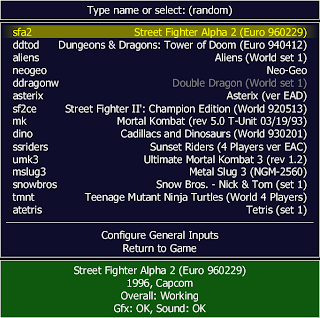
The other way to run a game is to include the name of the ROM file of the game to the command, which will start the game directly. For instance, if you want to play the game "Hard Hat", you should enter the following command:
| c:\mame>mame64.exe hardhat |
Here, "hardhat" is the name of the ROM file. If the game does not start, this could be because of a number of reasons. Double check that the ROM file is in the "roms" directory, with the correct name and extension. It is important that the name of the zip file is exactly the same as what the program is expecting, otherwise MAME will not be able to start the game. Next, it could be that the game needs another file to run. For instance, Neo-Geo games will require what is known as a "Neo-Geo Bios" file to run. Finally, you might have an old version of the ROM file. As new versions of MAME come out, some games are updated and your ROM file should be the most recent version of the game as well. If you suspect this might be the case, try obtaining the ROM file from different sources.
Once you get the game running, you might want to re-define the controls for the game. To do this, press the TAB button while running the game.
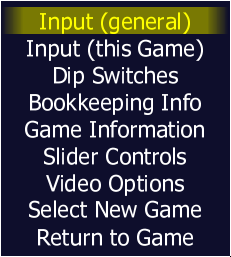
From the menu, you can define the keys just for the game you are playing (Input (This Game) option) or for all the games (Input (General) option). Depending on the game, options such as difficulty, starting lives, bonus lives etc. may be changed from the "Dip Switches" section. You might also want to go to the "Video Options" section and try different video modes to see which one you like the best.
If you would like to use a joystick, you should add the "-joy" option to the command. For instance, to play the game "Hard Hat" with a joystick, enter the following command:
| c:\mame>mame64.exe hardhat -joy |
Similarly, if you would like to use mouse as a controller (for shooting games for instance), you should use the "-mouse" option.
If you want to keep your ROM files in a different folder (for instance, if you have multiple versions of MAME and would like all of them to use the same ROM folder), you should first ask MAME to create a config file by entering the following:
| c:\mame>mame64.exe -cc |
This will create a file named "mame.ini" in your MAME directory. Next, open this file with a text editor and change the value that corresponds to "rompath" with the folder you would like to use.
The last thing I will cover in this tutorial is saving and loading within MAME. This is a very useful feature of MAME, one which you don't get with real arcade machines. While playing a game, you can save your progress by pressing SHIFT+F7 and then choosing a position (i.e. a number from 1 to 9). Later (of course, when you are running the same game) you can go back to your saved position by pressing F7 followed by the number you chose when you saved the game. When you want to play a certain part of the game, like a fight with a final boss, this feature will save you the trouble of playing the whole game to get to that point.
I recently got a cocktail arcade machine at my place and it is great having one at home. Brings back all those fun memories
ReplyDeletedouble dragon 2
ReplyDeletedouble dragon 3
double dragon neo geo
dungeon dragons shadow over mystara
lethal enforcers
ReplyDeletelethal enforcers
2
lethal enforcers 3
arcade version of asterix
ReplyDeletethe punisher
ReplyDeleteTetris grand master
ReplyDeletesnow bros 2
Street fighter alpha
ReplyDeleteStreet fighter alpha 3
Street fighter 2
ReplyDeleteStreet fighter 2 turbo
super street fighter 2
super street fighter 2 turbo
Street fighter 1
DeleteStreet fighter movie
Street fighter ex
Street fighter ex 2
Street fighter 3 third strike fight for the future
x- men vs. street fighter
marvel super heroes vs. street fighter
street fighter ex plus
Deletestreet fighter ex 2 plus
street fighter 3 new generation
street fighter 3 third strike fight for the future
street fighter iv
street fighter 3 2nd giant attack
DeleteMortal Kombat 2
ReplyDeleteMortal Kombat 3
Mortal Kombat 4
turtles in time
ReplyDeletedeveloper Konami
publisher Konami
series teenage mutant ninja turtles
platforms super nes
genre beat em up
PlayStation
ReplyDeletePlayStation 2
Atari
ReplyDeleteAtari 2600
Atari 2500
Atari 7800
Atari Jaguar
Atari Lynx
sega
sega sg1000
sega master system
Sega Genesis
sega game gear
sega cd
sega 32x
sega dreamcast
Sega Saturn
sega Naomi 2
sega titan video
Taito
Bandai
pocket fighter
ReplyDeletesuper puzzle fighter 2 turbo
metal slug
ReplyDeletemetal slug 2
metal slug x
metal slug 4
metal slug 5
metal slug 6
368000
ReplyDeletenba jam
ReplyDeletearticle talk
developer midway
platforms arcade
super nes
nfl blitz
ReplyDeletedeveloper midway
platforms arcade Nintendo 64
hydro thunder
developer midway
platforms arcade PlayStation
Nintendo 64
dreamcast
gauntlet legends
developer Atari games
publisher Atari games
series gauntlet
platforms arcade PlayStation Nintendo 64
dreamcast
genre hack and slash
arcade system midway Vegas
San Francisco rush
ReplyDeleteDaytona USA
outrun
Ferrari 355 challenge
terminator 2nd judgment day
Area 51
time crisis 2
the house of the dead
the house of the dead 2
bad dudes
golden axe
double dragon
x- men
king of monsters
soul edge
raiden
smash tv
carnevil
ridge racer v
ReplyDeletegauntlet dark legacy
18 wheeler pro American trucker
ReplyDeleteamiga
ReplyDeleteAtari st
amstrad cpc
Commodore 64
Microsoft Windows
ms- dos
zx spectrum
turbograftx cd
ReplyDeleteking of monsters
ReplyDeleteStreet fighter
ReplyDeletesunset riders
ReplyDeletedeveloper Konami
publisher Konami
platforms arcade
super nes
Sega Genesis
genre light gun shooter
super famicom
ReplyDeleteart of fighting 2
ReplyDeletedeveloper snk
publisher snk
series art of fighting
platforms arcade
Neo Geo
Neo Geo cd
super famicom
genre fighting
arcade system Neo Geo mvs
fighter ‘s history
ReplyDeletedeveloper data east
publisher data east
series fighter’s history
platforms arcade snes
genre fighting
final fight
developer capcom
publisher capcom
series final fight
platforms arcade
genre beat em up
arcade system cps system
Super Nintendo entertainment system
sega cd
amiga
Atari st
amstrad cpc
Commodore 64
zx spectrum